本文参考了恩山论坛的这篇帖子,感谢各位大佬为社区做出的贡献。
本文用到的所有文件可在此下载,密码为 xr30。
前排提醒,刷机有风险,动手需谨慎。强烈建议看完本文后再动手刷机,避免走不必要的弯路。
开启 SSH
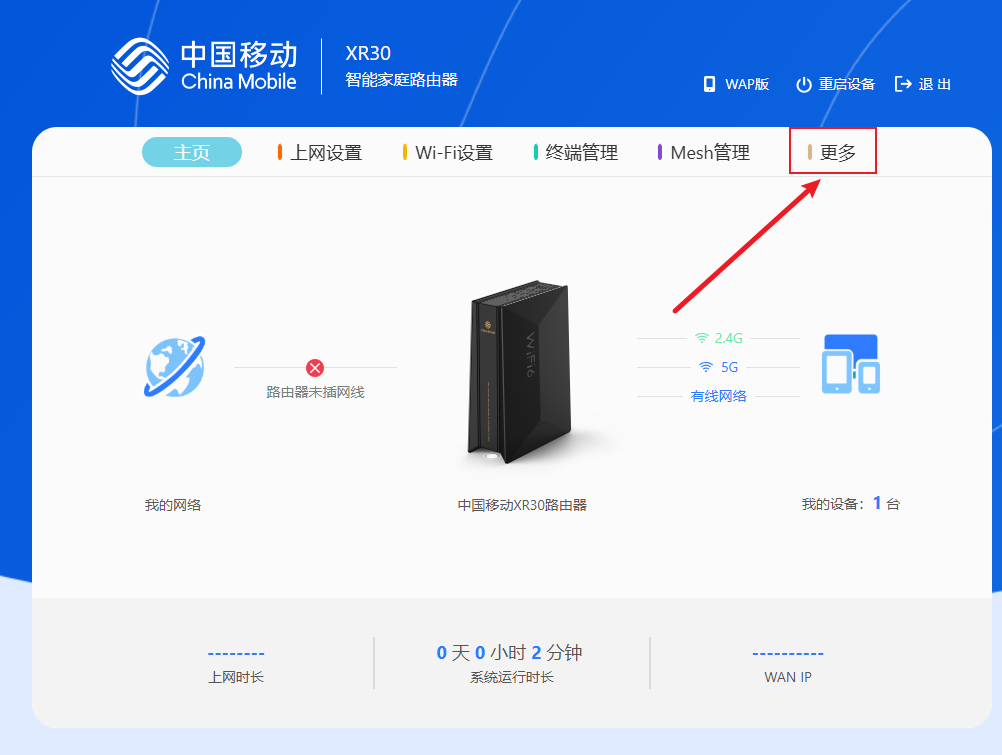
首先进入路由器的后台,进入主页后点击上方的 更多:
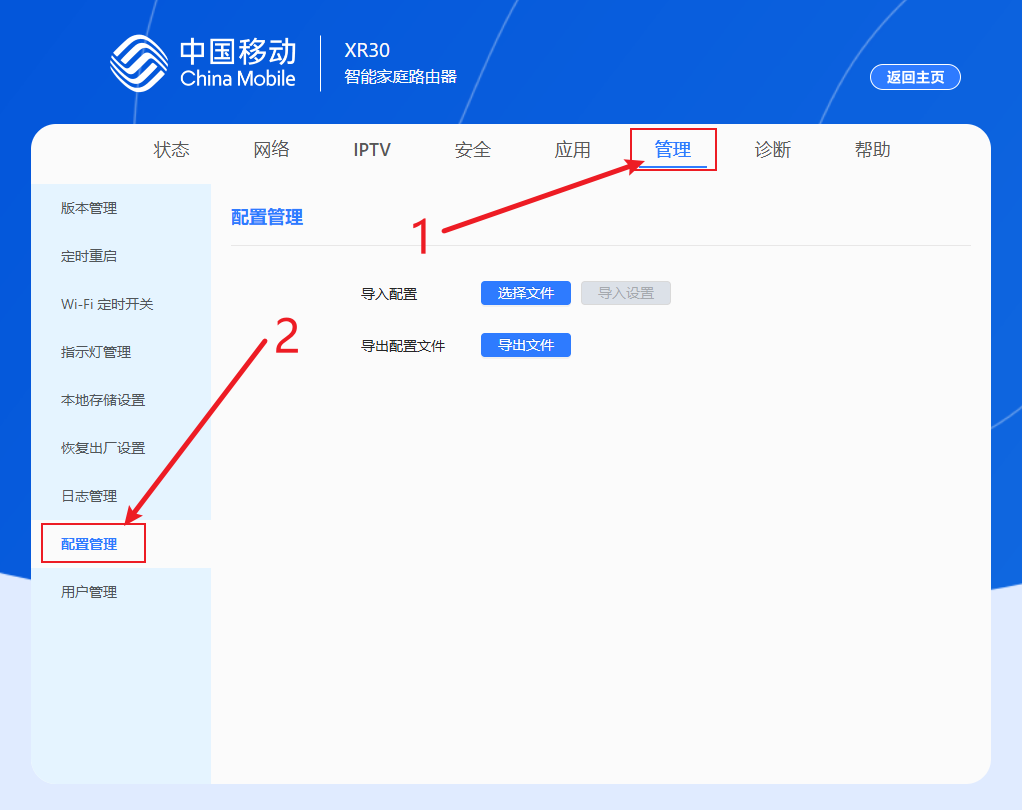
再依次点击 管理 => 配置管理 :
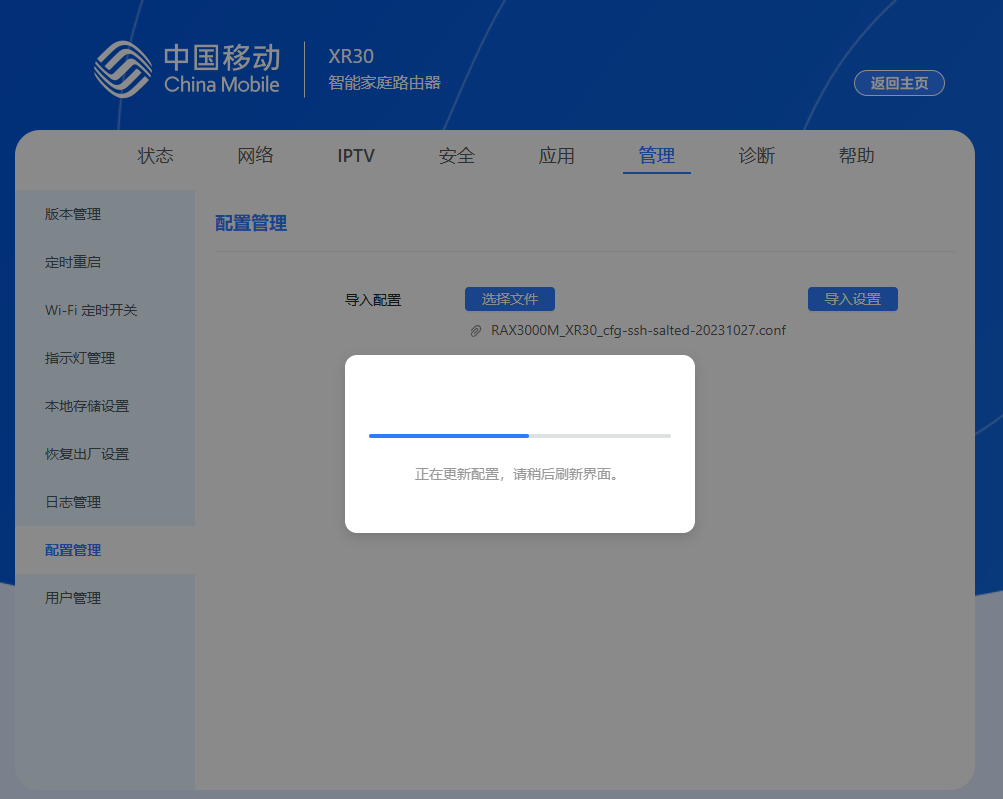
在这一步先点击 导出文件 ,然后使用 WinHex 查看导出的配置文件的头部有没有 Salted__ 字样。如果有就说明配置文件已加密,上传 RAX3000M_XR30_cfg-ssh-salted-20231027.conf 这个配置文件,重启后即可解锁 SSH ;如果导出的配置文件没有 Salted__ 字样,说明配置文件没有加密,上传 RAX3000M_XR30_cfg-ssh.conf 这个配置文件,重启后即可解锁 SSH 。配置文件和 WinHex 软件均在上面的分享链接里:
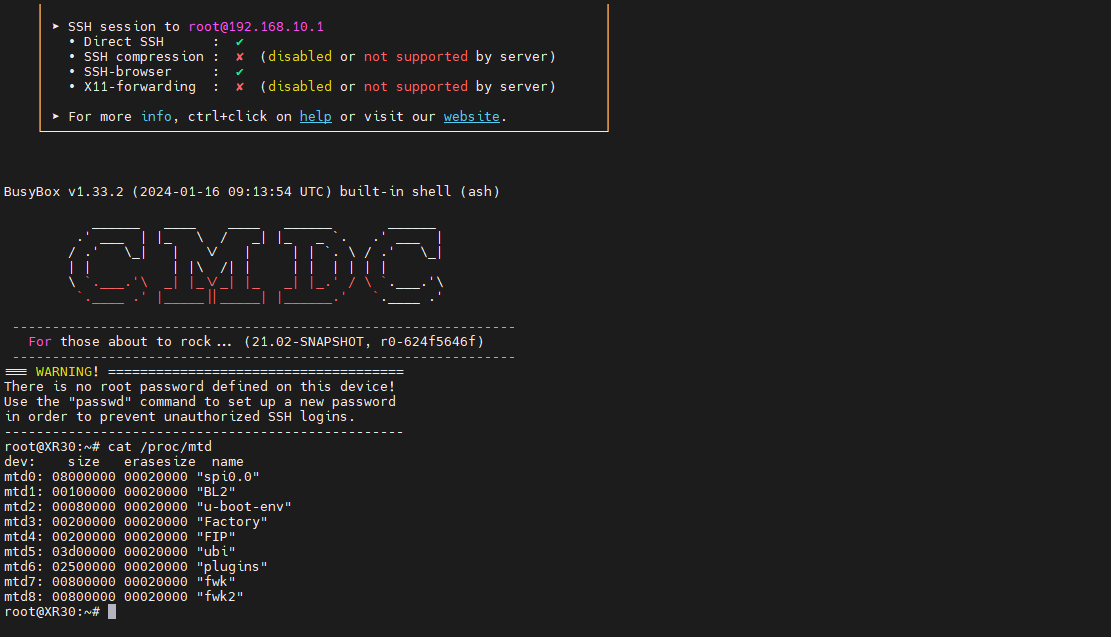
路由器重启后使用 SSH 工具进行远程链接,用户名为 root ,密码为空,直接回车即可进入 SSH 。
备份分区
在 SSH 里输入 cat /proc/mtd 查看分区布局:
 1
 2
 3
 4
 5
 6
 7
 8
 9
10
11
12
| root@XR30:~# cat /proc/mtd
dev: size erasesize name
mtd0: 08000000 00020000 "spi0.0"
mtd1: 00100000 00020000 "BL2"
mtd2: 00080000 00020000 "u-boot-env"
mtd3: 00200000 00020000 "Factory"
mtd4: 00200000 00020000 "FIP"
mtd5: 03d00000 00020000 "ubi"
mtd6: 02500000 00020000 "plugins"
mtd7: 00800000 00020000 "fwk"
mtd8: 00800000 00020000 "fwk2"
root@XR30:~#
|
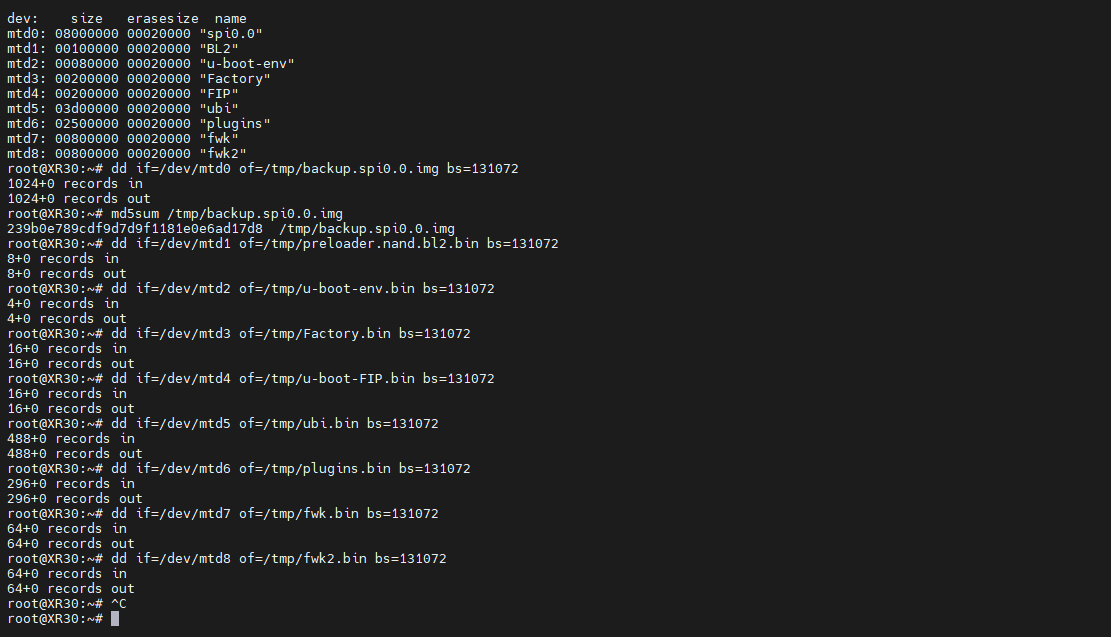
然后依次执行下面的命令进行备份,备份文件生成后使用 WinSCP 复制文件到电脑上。因为 /tmp 目录是在内存里的,所以不要一次性全部复制命令然后执行,否则可能会爆内存导致路由器重启:
 1
 2
 3
 4
 5
 6
 7
 8
 9
10
| dd if=/dev/mtd0 of=/tmp/backup.spi0.0.img bs=131072
md5sum /tmp/backup.img # 获取效验码
dd if=/dev/mtd1 of=/tmp/preloader.nand.bl2.bin bs=131072
dd if=/dev/mtd2 of=/tmp/u-boot-env.bin bs=131072
dd if=/dev/mtd3 of=/tmp/Factory.bin bs=131072
dd if=/dev/mtd4 of=/tmp/u-boot-FIP.bin bs=131072
dd if=/dev/mtd5 of=/tmp/ubi.bin bs=131072
dd if=/dev/mtd6 of=/tmp/plugins.bin bs=131072
dd if=/dev/mtd7 of=/tmp/fwk.bin bs=131072
dd if=/dev/mtd8 of=/tmp/fwk2.bin bs=131072
|
下面是运行的结果:
 1
 2
 3
 4
 5
 6
 7
 8
 9
10
11
12
13
14
15
16
17
18
19
20
21
22
23
24
25
26
27
28
29
30
| root@XR30:~# dd if=/dev/mtd0 of=/tmp/backup.spi0.0.img bs=131072
1024+0 records in
1024+0 records out
root@XR30:~# md5sum /tmp/backup.spi0.0.img
239b0e789cdf9d7d9f1181e0e6ad17d8 /tmp/backup.spi0.0.img
root@XR30:~# dd if=/dev/mtd1 of=/tmp/preloader.nand.bl2.bin bs=131072
8+0 records in
8+0 records out
root@XR30:~# dd if=/dev/mtd2 of=/tmp/u-boot-env.bin bs=131072
4+0 records in
4+0 records out
root@XR30:~# dd if=/dev/mtd3 of=/tmp/Factory.bin bs=131072
16+0 records in
16+0 records out
root@XR30:~# dd if=/dev/mtd4 of=/tmp/u-boot-FIP.bin bs=131072
16+0 records in
16+0 records out
root@XR30:~# dd if=/dev/mtd5 of=/tmp/ubi.bin bs=131072
488+0 records in
488+0 records out
root@XR30:~# dd if=/dev/mtd6 of=/tmp/plugins.bin bs=131072
296+0 records in
296+0 records out
root@XR30:~# dd if=/dev/mtd7 of=/tmp/fwk.bin bs=131072
64+0 records in
64+0 records out
root@XR30:~# dd if=/dev/mtd8 of=/tmp/fwk2.bin bs=131072
64+0 records in
64+0 records out
root@XR30:~#
|
刷写 U-Boot
这里用到的 U-Boot 镜像是 Hanwckf 大佬的 mt7981_cmcc_xr30-fip-fixed-parts.bin ,解压分享链接里的 mt7981_cmcc_xr30-fip-fixed-parts.zip 即可获得。下载完成后使用 WinSCP 将镜像文件上传到路由器的 /tmp 目录下,输入下面的命令把 U-Boot 刷入 FIP 分区:
1
2
3
4
| # 刷写 FIP
mtd write /tmp/mt7981_cmcc_xr30-fip-fixed-parts.bin FIP
# 校验 FIP
mtd verify /tmp/mt7981_cmcc_xr30-fip-fixed-parts.bin FIP
|
下面是运行的结果:
 1
 2
 3
 4
 5
 6
 7
 8
 9
10
| root@XR30:~# mtd write /tmp/mt7981_cmcc_xr30-fip-fixed-parts.bin FIP
Unlocking FIP ...
Writing from /tmp/mt7981_cmcc_xr30-fip-fixed-parts.bin to FIP ...
root@XR30:~# mtd verify /tmp/mt7981_cmcc_xr30-fip-fixed-parts.bin FIP
Verifying FIP against /tmp/mt7981_cmcc_xr30-fip-fixed-parts.bin ...
6765f2e948fc0a90c00a191e62005a66 - FIP
6765f2e948fc0a90c00a191e62005a66 - /tmp/mt7981_cmcc_xr30-fip-fixed-parts.bin
Success
root@XR30:~#
|
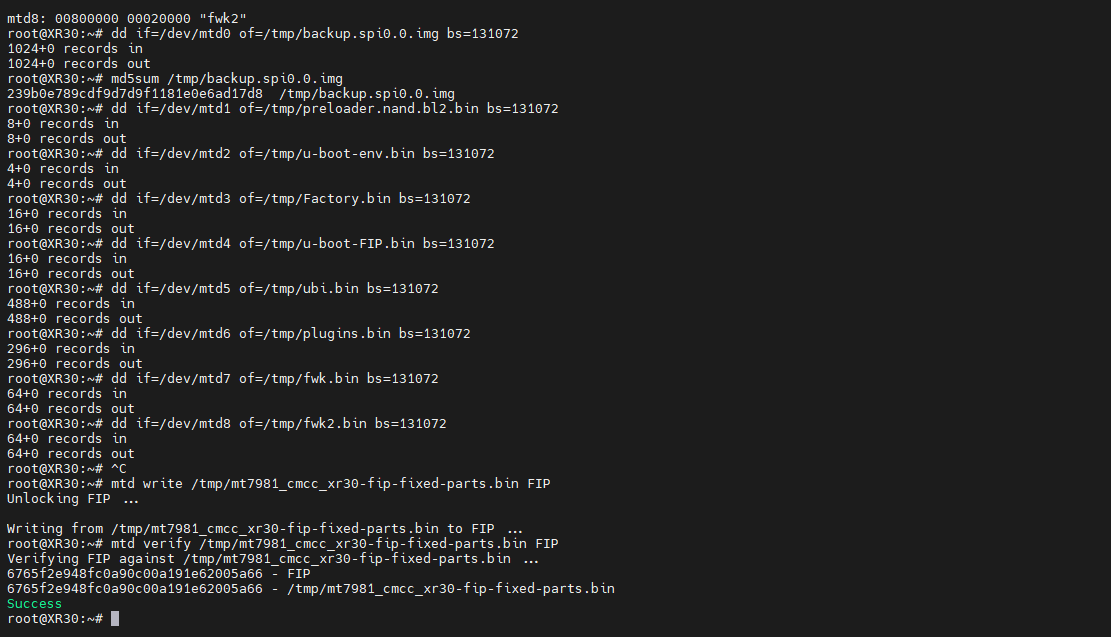
当看到有 Success 字样时,说明刷写成功。
Hanwckf 大佬的 U-Boot 默认开启 NMBM ,只能刷写开启 NMBM 的固件,不支持任何 ubootmod 分区布局的主线固件。如果这里你刷错了 U-Boot 无法开机,可以看后面的救砖章节进行救砖。
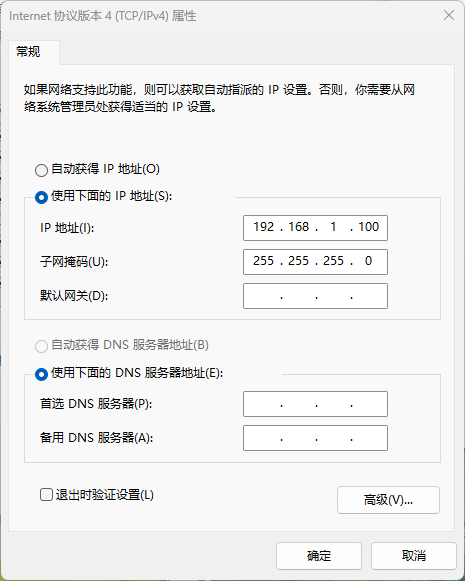
刷写成功之后直接拔掉电源,按住 Reset 按钮后再插上电源,等待指示灯由红色闪烁变为白色常亮即可进入 U-Boot 。此时将网卡的 IP 地址设置为 192.168.1.100 ,子网掩码设置为 255.255.255.0 ,在浏览器中输入 192.168.1.1 即可进入 U-Boot 网页后台:
刷写系统
目前 XR30 NAND 版几乎没什么现成且可用的系统,虽然 Hanwckf 大佬的源码早已适配了 XR30 ,但是需要自己编译。我这里使用的是 Kwrt ,目前发现只有指示灯适配得不怎么好,但胜在可用。你可以在这里下载固件。这里我就不多赘述了。
救砖
目前貌似只有两种砖法,一种是刷 U-Boot 变砖,另一种是刷不兼容的固件变砖(比如直接刷 RAX3000M 的固件)。这两种情况分开来说。
拆机
救砖需要拆机上 TTL ,可以到淘宝几块钱买一条 CH340 芯片的 TTL 线。拆机可以参考 B 站 UP 主 你逗你玩 的视频中的 拆机 章节:
拆机要先拆印有有 WiFi6 字样的那一面,或是撕开底部贴纸后印着 文字朝上 的箭头指着的那一面。因为另一面有螺丝固定,强行拆开的话会损坏外壳。
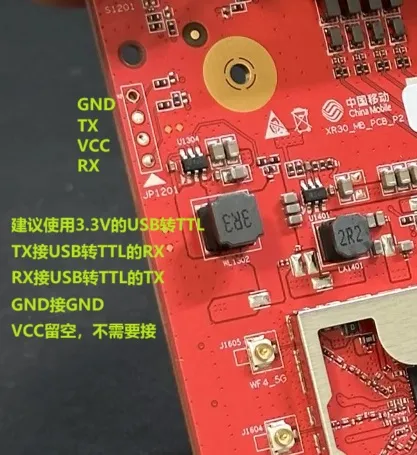
TTL 针脚定义可以参考下面这张图:
刷 U-Boot 变砖
这里我没有变砖,具体教程可以参考恩山论坛的这篇帖子。
刷不兼容的固件变砖
下面是我刷入 RAX3000M 固件后手动进入 U-Boot 的启动日志:
  1
  2
  3
  4
  5
  6
  7
  8
  9
 10
 11
 12
 13
 14
 15
 16
 17
 18
 19
 20
 21
 22
 23
 24
 25
 26
 27
 28
 29
 30
 31
 32
 33
 34
 35
 36
 37
 38
 39
 40
 41
 42
 43
 44
 45
 46
 47
 48
 49
 50
 51
 52
 53
 54
 55
 56
 57
 58
 59
 60
 61
 62
 63
 64
 65
 66
 67
 68
 69
 70
 71
 72
 73
 74
 75
 76
 77
 78
 79
 80
 81
 82
 83
 84
 85
 86
 87
 88
 89
 90
 91
 92
 93
 94
 95
 96
 97
 98
 99
100
101
102
103
104
105
106
107
108
109
110
111
112
113
114
115
116
117
118
119
120
121
122
123
124
125
126
127
128
129
130
131
132
133
134
135
136
137
138
139
140
141
142
143
144
145
146
147
148
149
150
151
152
153
154
155
156
157
158
159
160
161
162
163
164
165
166
167
168
169
170
171
172
173
174
175
176
177
178
179
180
181
182
183
184
185
186
187
188
189
190
191
192
193
194
195
196
197
198
199
200
| F0: 102B 0000
FA: 1040 0000
FA: 1040 0000 [0200]
F9: 0000 0000
V0: 0000 0000 [0001]
00: 0000 0000
BP: 2400 0041 [0000]
G0: 1190 0000
EC: 0000 0000 [1000]
T0: 0000 024B [010F]
Jump to BL
NOTICE: BL2: v2.7(release):624f5646f-dirty
NOTICE: BL2: Built : 21:14:57, Jan 16 2024
NOTICE: WDT: disabled
NOTICE: EMI: Using DDR4 settings
[TxChooseVref] Worse bit 1, Min win 24, Win sum 389, Final Vref 38
NOTICE: EMI: Detected DRAM size: 512MB
NOTICE: EMI: complex R/W mem test passed
NOTICE: CPU: MT7981 (1300MHz)
NOTICE: PP COPY 0 CRC read: 0x545, compute: 0x545
NOTICE: SPI_NAND parses attributes from parameter page.
NOTICE: SPI_NAND Detected ID 0xc8
NOTICE: Page size 2048, Block size 131072, size 134217728
NOTICE: Initializing NMBM ...
NOTICE: NMBM management region starts at block 960 [0x07800000]
NOTICE: Bad block 961 [0x07820000]
NOTICE: Bad block 962 [0x07840000]
NOTICE: Bad block 963 [0x07860000]
NOTICE: Bad block 964 [0x07880000]
NOTICE: Bad block 965 [0x078a0000]
NOTICE: Bad block 966 [0x078c0000]
NOTICE: Bad block 967 [0x078e0000]
NOTICE: Bad block 968 [0x07900000]
NOTICE: Bad block 969 [0x07920000]
NOTICE: Bad block 970 [0x07940000]
NOTICE: Bad block 971 [0x07960000]
NOTICE: Bad block 972 [0x07980000]
NOTICE: Bad block 973 [0x079a0000]
NOTICE: Bad block 974 [0x079c0000]
NOTICE: Bad block 975 [0x079e0000]
NOTICE: Bad block 976 [0x07a00000]
NOTICE: Bad block 977 [0x07a20000]
NOTICE: Bad block 978 [0x07a40000]
NOTICE: Bad block 979 [0x07a60000]
NOTICE: Bad block 980 [0x07a80000]
NOTICE: Bad block 981 [0x07aa0000]
NOTICE: Bad block 982 [0x07ac0000]
NOTICE: Bad block 983 [0x07ae0000]
NOTICE: Bad block 984 [0x07b00000]
NOTICE: Bad block 985 [0x07b20000]
NOTICE: Bad block 986 [0x07b40000]
NOTICE: Bad block 987 [0x07b60000]
NOTICE: Bad block 988 [0x07b80000]
NOTICE: Bad block 989 [0x07ba0000]
NOTICE: Bad block 990 [0x07bc0000]
NOTICE: Bad block 991 [0x07be0000]
NOTICE: Bad block 992 [0x07c00000]
NOTICE: Bad block 993 [0x07c20000]
NOTICE: Bad block 994 [0x07c40000]
NOTICE: Bad block 995 [0x07c60000]
NOTICE: Bad block 996 [0x07c80000]
NOTICE: Bad block 997 [0x07ca0000]
NOTICE: Bad block 998 [0x07cc0000]
NOTICE: Bad block 999 [0x07ce0000]
NOTICE: Bad block 1000 [0x07d00000]
NOTICE: Bad block 1001 [0x07d20000]
NOTICE: Bad block 1002 [0x07d40000]
NOTICE: Bad block 1003 [0x07d60000]
NOTICE: Bad block 1004 [0x07d80000]
NOTICE: Bad block 1005 [0x07da0000]
NOTICE: Bad block 1006 [0x07dc0000]
NOTICE: Bad block 1007 [0x07de0000]
NOTICE: Bad block 1008 [0x07e00000]
NOTICE: Bad block 1009 [0x07e20000]
NOTICE: Bad block 1010 [0x07e40000]
NOTICE: Bad block 1011 [0x07e60000]
NOTICE: Bad block 1012 [0x07e80000]
NOTICE: Bad block 1013 [0x07ea0000]
NOTICE: Bad block 1014 [0x07ec0000]
NOTICE: Bad block 1015 [0x07ee0000]
NOTICE: Bad block 1016 [0x07f00000]
NOTICE: Bad block 1017 [0x07f20000]
NOTICE: Bad block 1018 [0x07f40000]
NOTICE: Bad block 1019 [0x07f60000]
NOTICE: Bad block 1020 [0x07f80000]
NOTICE: Bad block 1021 [0x07fa0000]
NOTICE: Bad block 1022 [0x07fc0000]
NOTICE: Bad block 1023 [0x07fe0000]
NOTICE: NMBM has been initialized in read-only mode
NOTICE: BL2: Booting BL31
INFO: Total CPU count: 2
INFO: MCUSYS: L2C share 256K --> 0K
INFO: Disable NETSYS SRAM remapping
INFO: SPMC: Changed to SPMC mode
NOTICE: BL31: v2.9.0(release):20240123-65-g15ad0ed9
NOTICE: BL31: Built : 02:41:37, Nov 15 2024
INFO: GICv3 without legacy support detected.
INFO: ARM GICv3 driver initialized in EL3
INFO: Maximum SPI INTID supported: 671
INFO: BL31: Initializing runtime services
INFO: Secondary bootloader is AArch64
INFO: BL31: Preparing for EL3 exit to normal world
INFO: Entry point address = 0x41e00000
INFO: SPSR = 0x3c9
U-Boot 2023.07 (Nov 15 2024 - 02:41:33 +0800)
CPU: MediaTek MT7981
Model: mt7981-cmcc-xr30
(mediatek,mt7981-rfb)
DRAM: 512 MiB
Core: 28 devices, 14 uclasses, devicetree: embed
Initializing NMBM ...
spi-nand: spi_nand spi_nand@0: GigaDevice SPI NAND was found.
spi-nand: spi_nand spi_nand@0: 128 MiB, block size: 128 KiB, page size: 2048, OOB size: 128
Could not find a valid device for nmbm0
NMBM management region starts at block 960 [0x07800000]
Bad block 961 [0x07820000]
Bad block 962 [0x07840000]
Bad block 963 [0x07860000]
Bad block 964 [0x07880000]
Bad block 965 [0x078a0000]
Bad block 966 [0x078c0000]
Bad block 967 [0x078e0000]
Bad block 968 [0x07900000]
Bad block 969 [0x07920000]
Bad block 970 [0x07940000]
Bad block 971 [0x07960000]
Bad block 972 [0x07980000]
Bad block 973 [0x079a0000]
Bad block 974 [0x079c0000]
Bad block 975 [0x079e0000]
Bad block 976 [0x07a00000]
Bad block 977 [0x07a20000]
Bad block 978 [0x07a40000]
Bad block 979 [0x07a60000]
Bad block 980 [0x07a80000]
Bad block 981 [0x07aa0000]
Bad block 982 [0x07ac0000]
Bad block 983 [0x07ae0000]
Bad block 984 [0x07b00000]
Bad block 985 [0x07b20000]
Bad block 986 [0x07b40000]
Bad block 987 [0x07b60000]
Bad block 988 [0x07b80000]
Bad block 989 [0x07ba0000]
Bad block 990 [0x07bc0000]
Bad block 991 [0x07be0000]
Bad block 992 [0x07c00000]
Bad block 993 [0x07c20000]
Bad block 994 [0x07c40000]
Bad block 995 [0x07c60000]
Bad block 996 [0x07c80000]
Bad block 997 [0x07ca0000]
Bad block 998 [0x07cc0000]
Bad block 999 [0x07ce0000]
Bad block 1000 [0x07d00000]
Bad block 1001 [0x07d20000]
Bad block 1002 [0x07d40000]
Bad block 1003 [0x07d60000]
Bad block 1004 [0x07d80000]
Bad block 1005 [0x07da0000]
Bad block 1006 [0x07dc0000]
Bad block 1007 [0x07de0000]
Bad block 1008 [0x07e00000]
Bad block 1009 [0x07e20000]
Bad block 1010 [0x07e40000]
Bad block 1011 [0x07e60000]
Bad block 1012 [0x07e80000]
Bad block 1013 [0x07ea0000]
Bad block 1014 [0x07ec0000]
Bad block 1015 [0x07ee0000]
Bad block 1016 [0x07f00000]
Bad block 1017 [0x07f20000]
Bad block 1018 [0x07f40000]
Bad block 1019 [0x07f60000]
Bad block 1020 [0x07f80000]
Bad block 1021 [0x07fa0000]
Bad block 1022 [0x07fc0000]
Bad block 1023 [0x07fe0000]
Failed to write signature to a proper offset
Loading Environment from MTD... MTD device 'u-boot-env' not found
*** Warning - readenv() failed, using default environment
In: serial
Out: serial
Err: serial
Net:
Warning: ethernet@15100000 (eth0) using random MAC address - 9a:68:e5:35:82:e7
eth0: ethernet@15100000
RESET button is pressed for: 3 second(s)
Web failsafe UI started
URL: http://192.168.1.1/
Press Ctrl+C to exit
|
可以看到有很多坏块,这是因为 RAX3000M 的固件没有兆易创新的闪存驱动导致整个 UBI 分区被 NMBM 标记为坏块导致的。此时可以正常进入 U-Boot 网页后台,但是无法刷入固件和 U-Boot 。重新进入 U-Boot 命令行,输入下面这条命令强制擦除 spi-nand0 :
1
| mtd erase.dontskipbad spi-nand0 0x07820000 0x007e0000
|
上面这条命令的意思是,强制擦除设备 spi-nand0 (不管有没有坏块),起始地址为 0x07820000,擦除长度为 0x007e0000,根据被拉黑的末地址减去起始地址就可以计算出来。这条命令需要执行两次,因为第一次执行会留下一个坏块。下面是进入 U-Boot 命令行后第一次执行命令的结果:
 1
 2
 3
 4
 5
 6
 7
 8
 9
10
11
12
13
14
15
16
17
18
19
20
21
22
23
24
25
26
27
28
29
30
31
32
33
34
35
36
37
38
39
40
41
42
43
44
45
46
47
48
49
50
51
52
53
54
55
56
57
58
59
60
61
62
63
64
65
66
67
68
69
70
71
72
73
74
75
76
77
78
79
80
81
82
83
84
85
86
87
88
89
90
91
92
93
| Loading Environment from MTD... MTD device 'u-boot-env' not found
*** Warning - readenv() failed, using default environment
In: serial
Out: serial
Err: serial
Net:
Warning: ethernet@15100000 (eth0) using random MAC address - b2:cb:e9:c7:b6:2b
eth0: ethernet@15100000
*** U-Boot Boot Menu ***
1. Startup system (Default)
2. Upgrade firmware
3. Upgrade ATF BL2
4. Upgrade ATF FIP
5. Upgrade single image
6. Load image
7. Start Web failsafe
0. U-Boot console
Press UP/DOWN to move, ENTER to select, ESC to quit
Hit any key to stop autoboot: 0
MT7981>
MT7981>
MT7981>
MT7981> mtd erase.dontskipbad spi-nand0 0x07820000 0x007e0000
Erasing 0x07820000 ... 0x07ffffff (63 eraseblock(s))
nand: attempt to erase a bad/reserved block @7820000
nand: attempt to erase a bad/reserved block @7840000
nand: attempt to erase a bad/reserved block @7860000
nand: attempt to erase a bad/reserved block @7880000
nand: attempt to erase a bad/reserved block @78a0000
nand: attempt to erase a bad/reserved block @78c0000
nand: attempt to erase a bad/reserved block @78e0000
nand: attempt to erase a bad/reserved block @7900000
nand: attempt to erase a bad/reserved block @7920000
nand: attempt to erase a bad/reserved block @7940000
nand: attempt to erase a bad/reserved block @7960000
nand: attempt to erase a bad/reserved block @7980000
nand: attempt to erase a bad/reserved block @79a0000
nand: attempt to erase a bad/reserved block @79c0000
nand: attempt to erase a bad/reserved block @79e0000
nand: attempt to erase a bad/reserved block @7a00000
nand: attempt to erase a bad/reserved block @7a20000
nand: attempt to erase a bad/reserved block @7a40000
nand: attempt to erase a bad/reserved block @7a60000
nand: attempt to erase a bad/reserved block @7a80000
nand: attempt to erase a bad/reserved block @7aa0000
nand: attempt to erase a bad/reserved block @7ac0000
nand: attempt to erase a bad/reserved block @7ae0000
nand: attempt to erase a bad/reserved block @7b00000
nand: attempt to erase a bad/reserved block @7b20000
nand: attempt to erase a bad/reserved block @7b40000
nand: attempt to erase a bad/reserved block @7b60000
nand: attempt to erase a bad/reserved block @7b80000
nand: attempt to erase a bad/reserved block @7ba0000
nand: attempt to erase a bad/reserved block @7bc0000
nand: attempt to erase a bad/reserved block @7be0000
nand: attempt to erase a bad/reserved block @7c00000
nand: attempt to erase a bad/reserved block @7c20000
nand: attempt to erase a bad/reserved block @7c40000
nand: attempt to erase a bad/reserved block @7c60000
nand: attempt to erase a bad/reserved block @7c80000
nand: attempt to erase a bad/reserved block @7ca0000
nand: attempt to erase a bad/reserved block @7cc0000
nand: attempt to erase a bad/reserved block @7ce0000
nand: attempt to erase a bad/reserved block @7d00000
nand: attempt to erase a bad/reserved block @7d20000
nand: attempt to erase a bad/reserved block @7d40000
nand: attempt to erase a bad/reserved block @7d60000
nand: attempt to erase a bad/reserved block @7d80000
nand: attempt to erase a bad/reserved block @7da0000
nand: attempt to erase a bad/reserved block @7dc0000
nand: attempt to erase a bad/reserved block @7de0000
nand: attempt to erase a bad/reserved block @7e00000
nand: attempt to erase a bad/reserved block @7e20000
nand: attempt to erase a bad/reserved block @7e40000
nand: attempt to erase a bad/reserved block @7e60000
nand: attempt to erase a bad/reserved block @7e80000
nand: attempt to erase a bad/reserved block @7ea0000
nand: attempt to erase a bad/reserved block @7ec0000
nand: attempt to erase a bad/reserved block @7ee0000
nand: attempt to erase a bad/reserved block @7f00000
nand: attempt to erase a bad/reserved block @7f20000
nand: attempt to erase a bad/reserved block @7f40000
nand: attempt to erase a bad/reserved block @7f60000
nand: attempt to erase a bad/reserved block @7f80000
nand: attempt to erase a bad/reserved block @7fa0000
nand: attempt to erase a bad/reserved block @7fc0000
nand: attempt to erase a bad/reserved block @7fe0000
MT7981>
|
当第一次执行命令成功后直接拔掉电源,再次进入 U-Boot 。下面是第二次启动进入 U-Boot 命令行后执行命令的结果:
 1
 2
 3
 4
 5
 6
 7
 8
 9
10
11
12
13
14
15
16
17
18
19
20
21
22
23
24
25
26
27
28
29
30
31
32
33
34
35
36
37
38
39
40
41
42
43
44
45
46
47
48
49
50
51
52
53
54
55
56
57
58
59
60
61
62
63
64
65
66
67
68
69
70
71
72
73
74
75
76
77
78
79
80
81
82
83
84
85
86
87
88
| F0: 102B 0000
FA: 1040 0000
FA: 1040 0000 [0200]
F9: 0000 0000
V0: 0000 0000 [0001]
00: 0000 0000
BP: 2400 0041 [0000]
G0: 1190 0000
EC: 0000 0000 [1000]
T0: 0000 024B [010F]
Jump to BL
NOTICE: BL2: v2.7(release):624f5646f-dirty
NOTICE: BL2: Built : 21:14:57, Jan 16 2024
NOTICE: WDT: disabled
NOTICE: EMI: Using DDR4 settings
[TxChooseVref] Worse bit 1, Min win 24, Win sum 390, Final Vref 40
NOTICE: EMI: Detected DRAM size: 512MB
NOTICE: EMI: complex R/W mem test passed
NOTICE: CPU: MT7981 (1298MHz)
NOTICE: PP COPY 0 CRC read: 0x545, compute: 0x545
NOTICE: SPI_NAND parses attributes from parameter page.
NOTICE: SPI_NAND Detected ID 0xc8
NOTICE: Page size 2048, Block size 131072, size 134217728
NOTICE: Initializing NMBM ...
NOTICE: NMBM management region starts at block 960 [0x07800000]
NOTICE: NMBM has been initialized in read-only mode
NOTICE: BL2: Booting BL31
INFO: Total CPU count: 2
INFO: MCUSYS: L2C share 256K --> 0K
INFO: Disable NETSYS SRAM remapping
INFO: SPMC: Changed to SPMC mode
NOTICE: BL31: v2.9.0(release):20240123-65-g15ad0ed9
NOTICE: BL31: Built : 02:41:37, Nov 15 2024
INFO: GICv3 without legacy support detected.
INFO: ARM GICv3 driver initialized in EL3
INFO: Maximum SPI INTID supported: 671
INFO: BL31: Initializing runtime services
INFO: Secondary bootloader is AArch64
INFO: BL31: Preparing for EL3 exit to normal world
INFO: Entry point address = 0x41e00000
INFO: SPSR = 0x3c9
U-Boot 2023.07 (Nov 15 2024 - 02:41:33 +0800)
CPU: MediaTek MT7981
Model: mt7981-cmcc-xr30
(mediatek,mt7981-rfb)
DRAM: 512 MiB
Core: 28 devices, 14 uclasses, devicetree: embed
Initializing NMBM ...
spi-nand: spi_nand spi_nand@0: GigaDevice SPI NAND was found.
spi-nand: spi_nand spi_nand@0: 128 MiB, block size: 128 KiB, page size: 2048, OOB size: 128
Could not find a valid device for nmbm0
NMBM management region starts at block 960 [0x07800000]
Signature has been written to block 1023 [0x07fe0000]
Main info table has been written to block 960
Backup info table has been written to block 963
NMBM has been successfully created
Loading Environment from MTD... *** Warning - bad CRC, using default environment
In: serial
Out: serial
Err: serial
Net:
Warning: ethernet@15100000 (eth0) using random MAC address - e2:1c:6b:e9:2d:a2
eth0: ethernet@15100000
*** U-Boot Boot Menu ***
1. Startup system (Default)
2. Upgrade firmware
3. Upgrade ATF BL2
4. Upgrade ATF FIP
5. Upgrade single image
6. Load image
7. Start Web failsafe
0. U-Boot console
Press UP/DOWN to move, ENTER to select, ESC to quit
Hit any key to stop autoboot: 0
MT7981> mtd erase.dontskipbad spi-nand0 0x07820000 0x007e0000
Erasing 0x07820000 ... 0x07ffffff (63 eraseblock(s))
MT7981>
|
可以看到在第一次执行擦除命令后报错的坏块只剩一个,执行完第二次擦除命令后就可以重新进入 U-Boot 网页后台刷固件了。